
Control Systems: OPC UA built into the simulator, both ways
Control Systems lets the simulator stand in for a plant and its control system. Import the control system’s database, its I/O list or instrument index, straight into the app from a CSV file or an Excel workbook (.xlsx), and each row is matched to the model’s tags. The OPC UA server that comes with it lets your control system connect to the model directly, every tag named the way your DCS names it, and an optimizer, an advanced controller, an operator-training console or a historian read and write those tags too; turned the other way, an OPC UA client inside the app reads a running plant’s server, and the model follows the plant. It is a paid tier, not part of the free download, and is offered on request.
Two copies of the app, talking OPC UA
One copy plays the plant and serves its tags over OPC UA. A second copy is a model that follows it through its Plant Connection. A short Python program, not part of the app, stands in for the plant’s DCS.
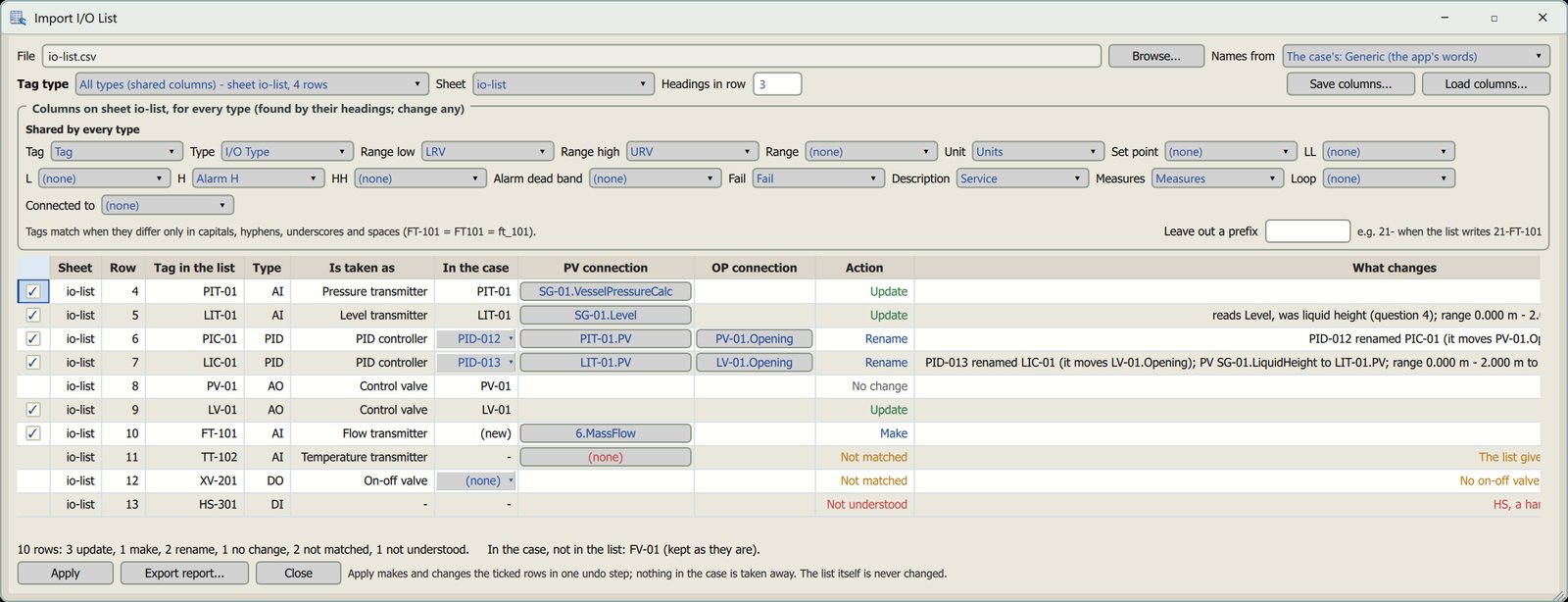
- Import I/O List reads the plant’s I/O list from Excel and matches each row to the model’s tags; Apply gives the controllers the list’s tags and makes the flow transmitter it names, in one undo step
- Export I/O List writes the model’s own list back to Excel, one sheet per tag type
- Link Settings > Start makes the plant copy an OPC UA server, and the program connects and reads its tags
- Plant Connection makes the second copy a client: the plant’s set point drives it, and its pressure is drawn beside the plant’s on the Strip Chart
- The program writes a new pressure set point to the plant; the plant’s controller takes it, and the model picks it up from the server and follows
Captioned, no sound needed. 3 min 55 s.
A server for your programs, a client for your plant
Both are part of the simulator, on the same case, in Steady State and in a dynamic run. Every picture below is from the app.
Your control system connects to the model directly
The OPC UA server comes with Control Systems, inside the simulator: a control system with an OPC UA client connects to the model directly, with no gateway and no second program between them, and so can an optimizer, an advanced controller, an operator-training console or a historian. Control Systems > Link Settings starts the server, on this PC at opc.tcp://localhost:4840 unless you open it to other computers. Each published row of the Tag Table is a variable with its value, its quality, a time stamp, its engineering units and its range, and a program may subscribe to any of them. A program’s write goes exactly where a value typed into the table would: in a run it is applied at the start of the next step. Each setting has one writer, so a write to a valve that a controller drives is refused, and the Link Log lists every connection and every write with its outcome. A program can also run, pause and step a dynamic run.

The model follows a running plant
Control Systems > Plant Connection reads another program’s OPC UA server: a plant’s DCS, its historian, another simulator, or a second copy of this app. Each row either drives the model with the plant’s value (a feed’s temperature, a controller’s set point, a valve’s opening) or is compared with the model’s own value, with the difference and a limit to be warned past. In Steady State, Read plant now writes the plant’s values in one undo step; in a dynamic run the model follows the plant at real time, and the Strip Chart draws the plant’s line beside the model’s. It only reads: the app never writes to the plant’s server.

Named the way your DCS names them
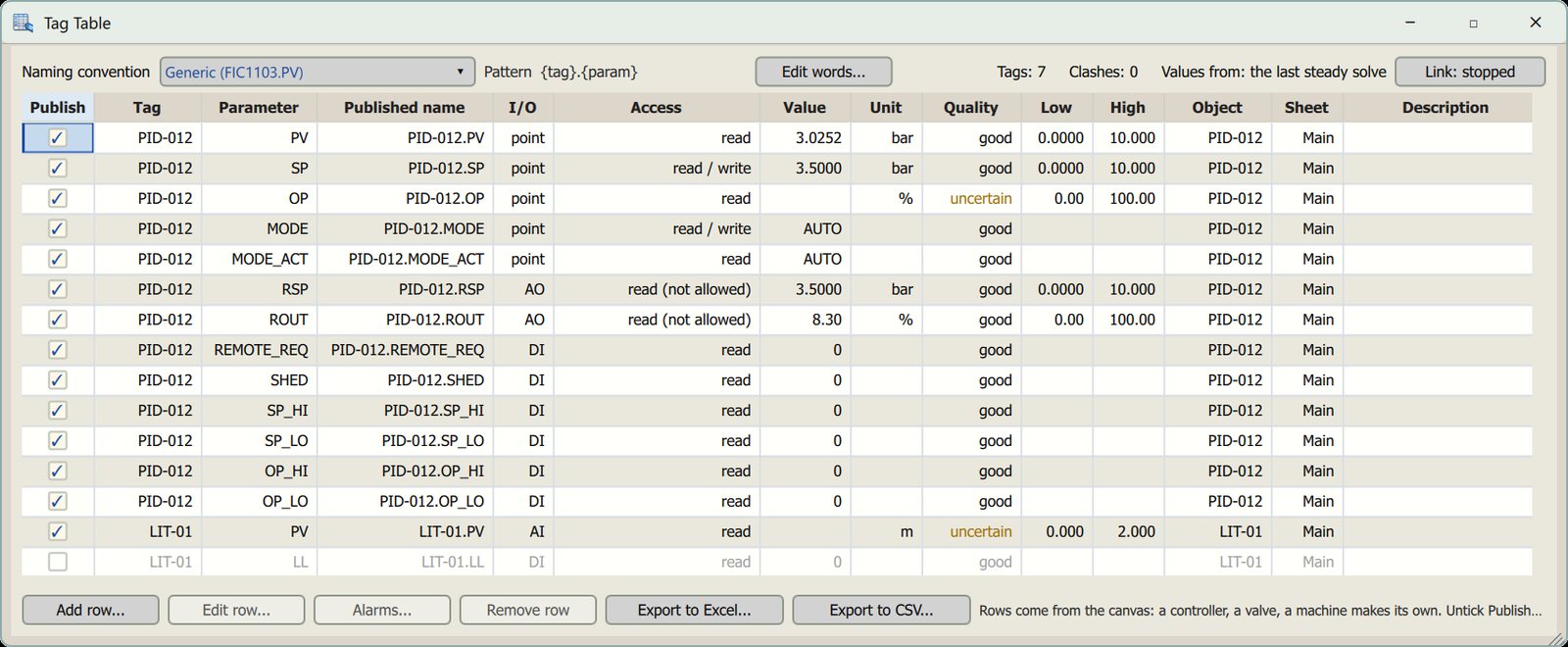
Nobody types the list in: the Tag Table is built from the case, every controller, transmitter, valve and machine making its rows, and Add row… publishes any stream’s or unit’s variable. A naming convention turns each tag and parameter into the name a program asks for: Generic, the OPC standard’s own example (FIC1103.PV); Emerson DeltaV (FIC1103/PID1/PV.CV); Yokogawa CENTUM VP (FIC1103.PV, .SV, .MV); Honeywell Experion (FIC1103.PIDA.PV), each in the form its maker’s documents give; or a Custom pattern of your own. The tags can sit in the same namespace and folders as on the plant’s own OPC server, so one program can be pointed at the plant or at the model. Show settings publishes every tuning and limit setting too.
Imported straight from CSV or Excel
A plant’s control system is engineered from lists. Import I/O List reads the control system’s database, its I/O list or instrument index, straight from a CSV file (comma or semicolon) or an Excel workbook (.xlsx), and matches each row to the case by its tag: it shows what each row is connected to, makes the transmitters and controllers the list names that the case lacks, and says before Apply which controllers already in the case would read or move something else. Export I/O List writes the case’s instruments, controllers, valves and machines back out, in the columns the import reads. Generate Instruments gives every controller that reads a stream or a unit directly a transmitter, and names every loop by ISA-5.1.
Field devices and controllers, as a DCS sees them
A plant’s control system sees more than numbers: instruments with ranges and alarms, valves that take time to stroke, motors that trip, readings that drift. Each is published on the link like any other tag.
Transmitters
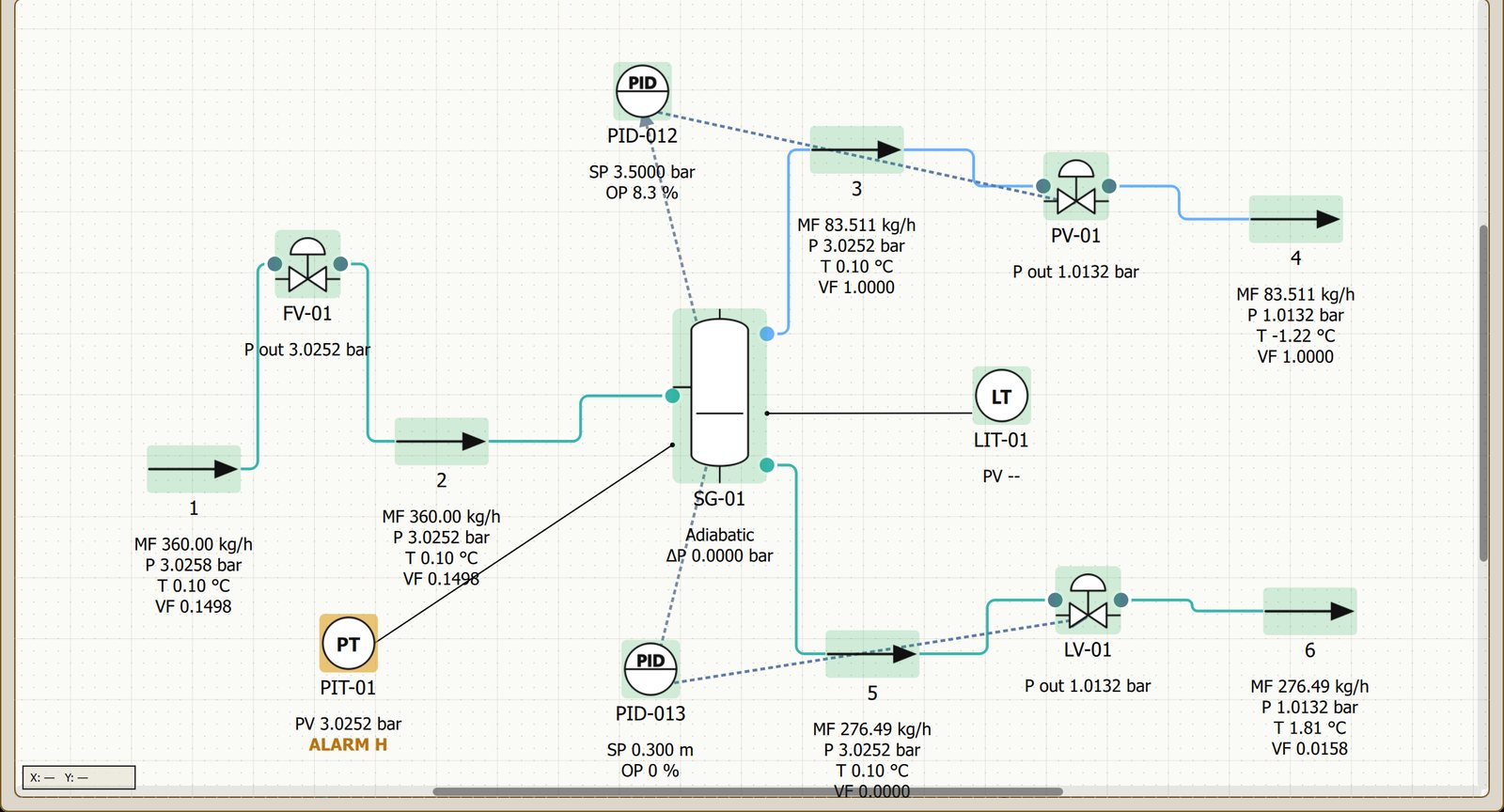
An FT, TT, PT or LT dropped on a stream or a unit reads its flow, temperature, pressure or level, and an XT any other variable, with a range, a 4 to 20 mA signal, a quality and four alarms, drawn as an ISA-5.1 bubble.
Alarms
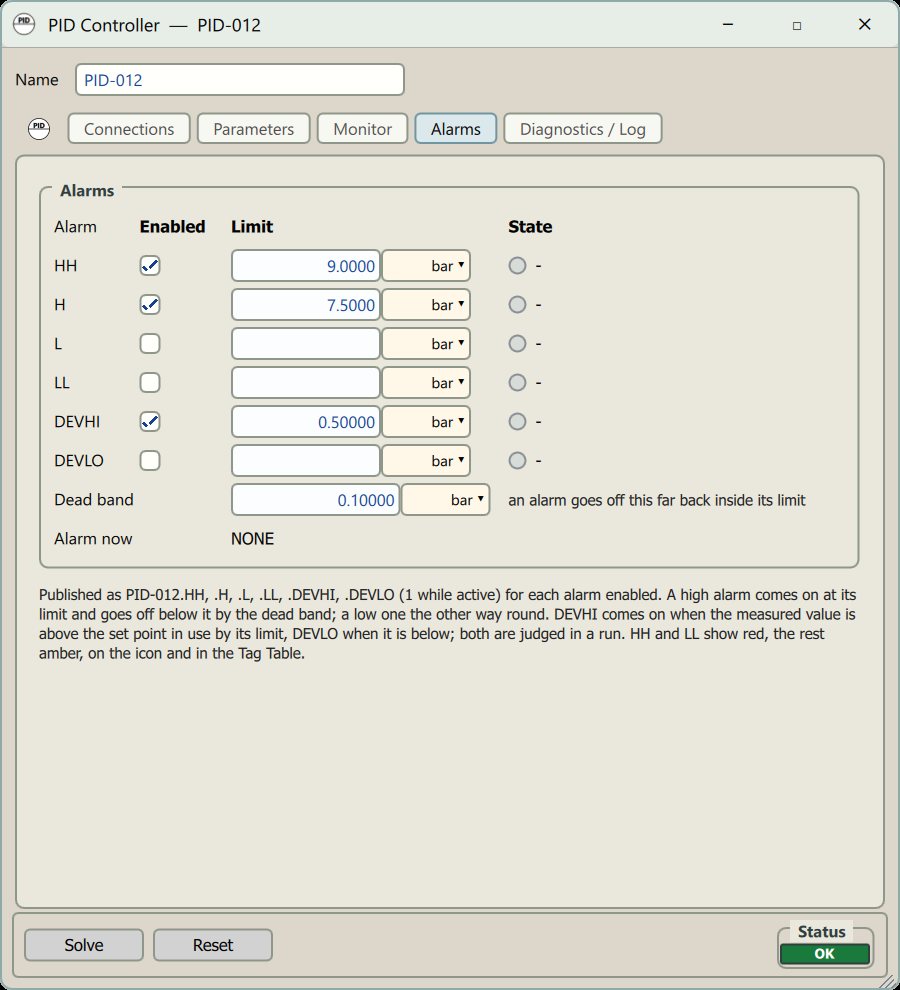
Every controller and transmitter carries LL, L, H and HH alarms on its measurement, and every controller DEVHI and DEVLO on its distance from the set point, with one dead band.

Remote set point and output
A program takes a loop over as it would on a DCS: the controller allows a remote set point or output, the program writes the remote mode and keeps writing, and if it falls silent the controller sheds to the mode you chose.

Valves as devices
A control valve, an on-off valve or a motor-operated valve, with stroke times, a fail position when its air or power is lost, limit switches and travel alarms. A valve can be set to stick, or to pass when it is shut.
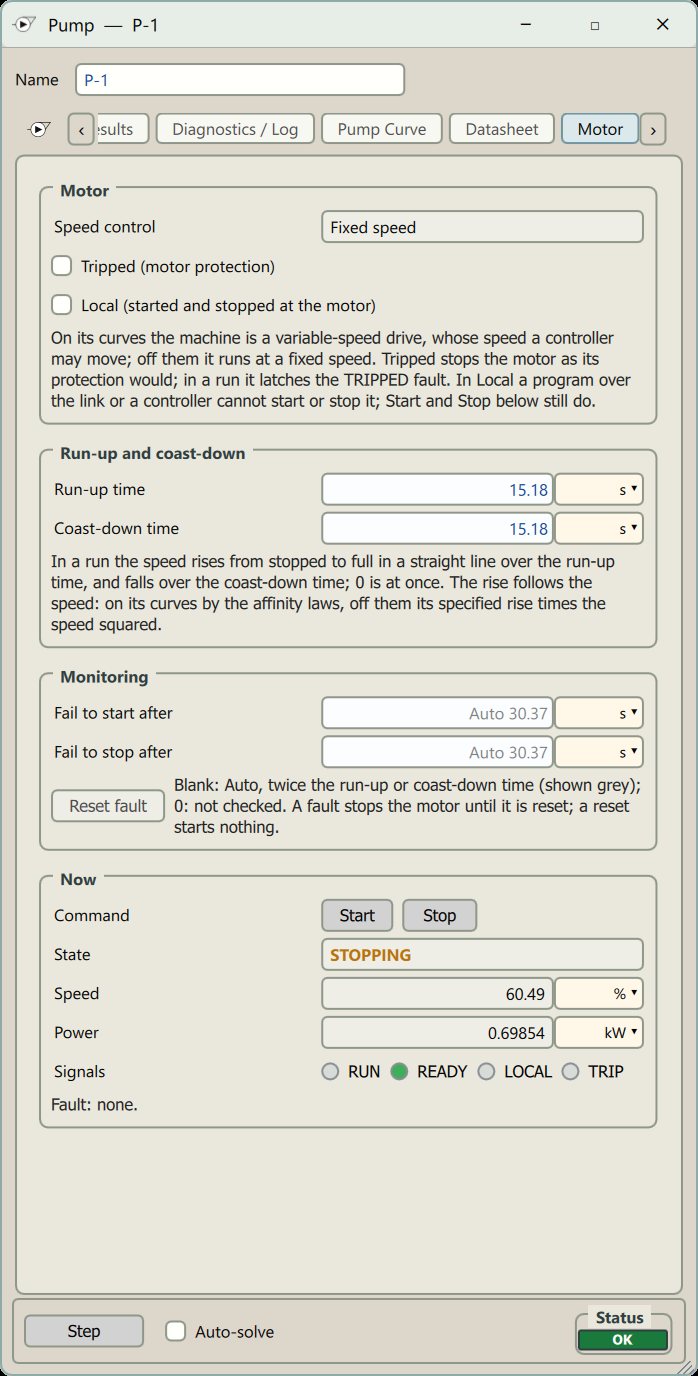
Motors and drives
Every pump, compressor and expander, and every air cooler’s fans, has a motor: started and stopped from the Tag Table, an event or a controller, with run-up and coast-down times and a trip, and its RUN, READY, LOCAL and TRIP signals.

Switches, analysers, totalizers
A switch that trips at a set point; an online analyser that reads late by its sample line, or shows a gas chromatograph’s result at the end of each cycle; and a totalizer that counts a flow up to a target, with a pre-trip.

Flow and level by differential pressure
A flow transmitter on an orifice plate (ISO 5167-2) and a level transmitter on a vessel work their reading out of a differential pressure: right at the conditions they were set up for, and off away from them, as a real meter is unless the control system compensates.

Sensor behaviour and faults
A transmitter can lag, read late and wander (damping, dead time and noise), and take a fault: frozen, a bias, a drift, a fixed value, failed high or low, or bad quality. A program that will run against a plant is tested against imperfect readings too.

Lock-step and snapshots
In lock-step a dynamic run moves only when the program on the link asks, by as much as it asks, so a test gives the same answer every time. Snapshots take a run back to a moment, and the program can take and restore them.
The only process simulator we found with all three built in
Import the control system’s database from CSV or Excel, serve the model’s tags to your control system over OPC UA, and read a running plant’s OPC UA server: in AI Process Simulator all three are part of the simulator itself, working on the same case as its steady-state solve and its dynamic run, with no add-on, no gateway and no separate training product.
In November 2026 we reviewed the public documentation of twelve process simulators: Aspen HYSYS, Aspen Plus Dynamics, Honeywell UniSim Design, AVEVA Process Simulation, PRO/II and Dynamic Simulation, CHEMCAD, DWSIM, Siemens gPROMS, Petro-SIM, ProMax and ProSim. We found none with all three in the simulator itself. Where they reach a control system, it is through the older OPC DA or HDA standards, through a separate operator-training product such as Aspen Operator Training, or through paid add-ons such as DWSIM’s Patreon extensions, and none was found to import a control system’s I/O list into the simulator itself.
At a fraction of the cost. Linking a process model to a control system is usually a high-end purchase. A seat of Aspen HYSYS with its Dynamics came to about US$74,000 a year at the rate in a public 2021 purchase order, before the separate operator-training product, and operator-training and control-checkout systems such as Siemens SIMIT, AVEVA Dynamic Simulation and Emerson Mimic are sold by quote. Control Systems costs a small fraction of that.
Its limits, in this version
- The link has no security: it listens on this PC only unless you open it to other computers, and then any computer that reaches its port can read and write the published tags
- The plant connection only reads, and has no encryption, so a plant server that demands encryption refuses it
- The control system is emulated in the app, not run on a maker’s own controller software, so a particular DCS’s own behaviour, such as how a controller starts up or limits its output, is not reproduced exactly
- Dynamic results are not checked against a plant’s measured response; how the program is validated →
The price: PEMEX purchase order 4400147737 of 21 December 2021, aspenONE Engineering, 41 tokens for 12 months, US$84,673; its token table puts HYSYS at 14 tokens a user and HYSYS Dynamics at 22. The comparison: each vendor’s public documentation as read in November 2026; a feature we did not find may still exist. All product names are trademarks of their respective owners, and OPC UA is a standard of the OPC Foundation. AI Process Simulator is not affiliated with or endorsed by any of them.
Getting Control Systems
Control Systems is a paid tier, not part of the free download, and is offered on request. If you are interested, please contact ruebenm@therqon.ca.